
Technology / OmindTech Journal
Why Building an App Is Not as Easy as It Seems: A Comprehensive Guide
Creating an app may seem simple on the surface, but it involves significant complexity. This article discusses key challenges and considerations in app development.

Why Building an App Is Not as Easy as It Seems: A Comprehensive Guide
Many people think that making an app is easy. With the emergence of no-code and low-code platforms, as well as abundant online tutorials, this perception is growing stronger. However, in reality, creating an app that truly functions, is reliable, and meets user needs is far more complicated than imagined. This article will thoroughly discuss the reasons why building an app is not easy, and what needs to be considered for your app project to succeed.
1. Thorough Planning: The Main Foundation of Success
Before writing a single line of code, thorough planning is crucial. This is not just about a 'great idea,' but about defining the problem to be solved, target users, key features, and a sustainable business model. Many app projects fail due to a lack of in-depth planning at the beginning.
1.1. Problem and Solution Definition
The first step is to identify the specific problem you want to solve with your app. Don't just make an app 'because it's cool,' but because there's a real, unmet need. Then, define how your app will be a better solution than existing alternatives.
1.2. Market Research and Target Users
Who are your app's target users? What are their needs and preferences? Comprehensive market research will help you understand user behavior, identify competitors, and determine the most important features.
1.3. Feature Creation and User Stories
Create a list of your app's key features. Each feature must be clearly documented, including user stories that explain how users will interact with that feature. User stories help the development team understand user needs from the user's perspective.
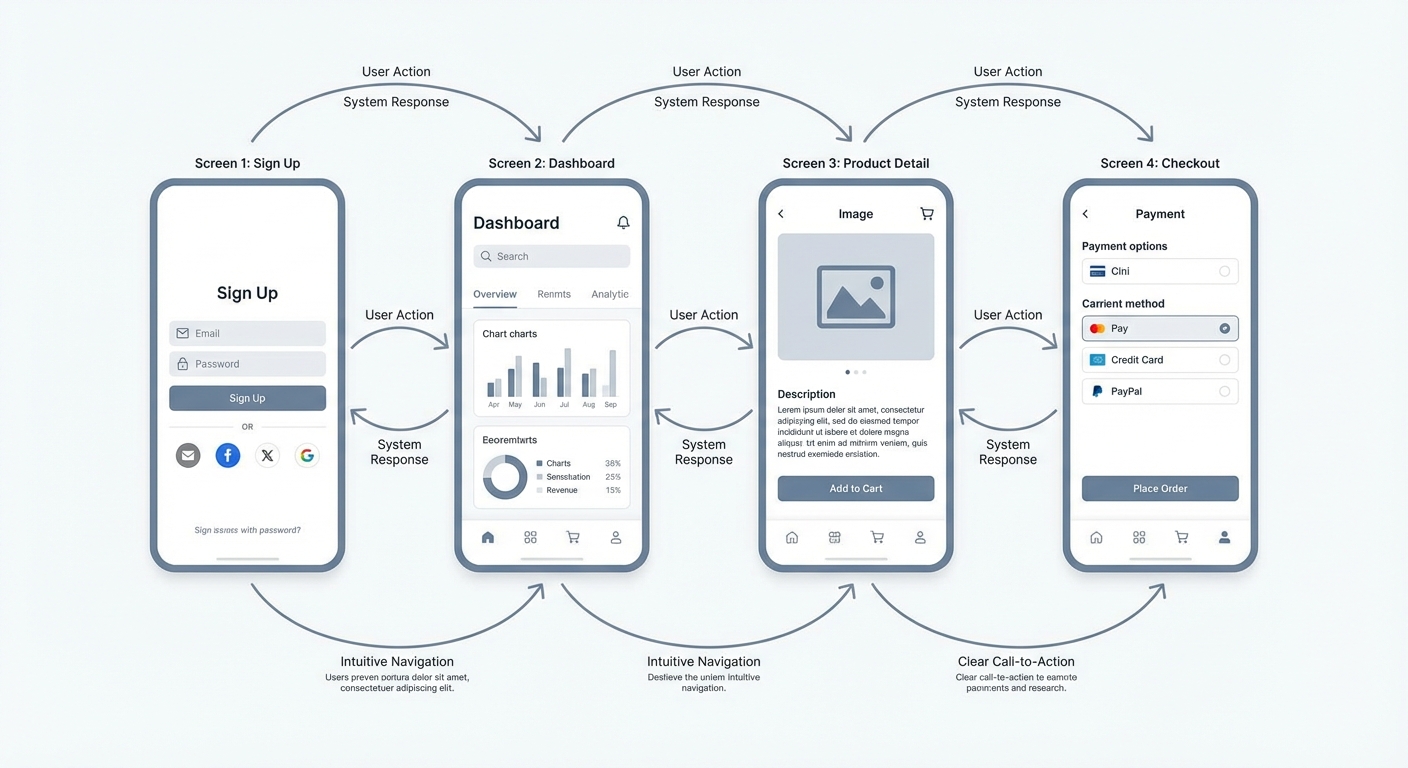
1.4. User Interface (UI) and User Experience (UX) Design Good UI/UX design is essential for an app's success. The UI must be intuitive and easy to use, while the UX must be pleasant and satisfying. Consider the
user flow and ensure that users can easily achieve their goals within the app. Mobile app UI/UX design mockup, showing clear user flow and an intuitive display.
App development involves many complex technical aspects, from selecting the right technology to writing clean and efficient code.
2.1. Choosing the Right Technology
There are many technologies available for app development, such as programming languages,
frameworks , anddatabases . Choosing the right technology is crucial to ensure that your app can be built efficiently and can bescaled in the future. Some factors to consider include cost, talent availability, and compatibility with the targeted platform. 2.2. Programming Languages and
Frameworks Common programming languages used for app development include Java, Kotlin (for Android), Swift, Objective-C (for iOS), JavaScript, React Native, Flutter (for
cross-platform development).). Frameworks like React, Angular, and Vue.js help accelerate the development process and improve code quality.
2.3. Application Architecture
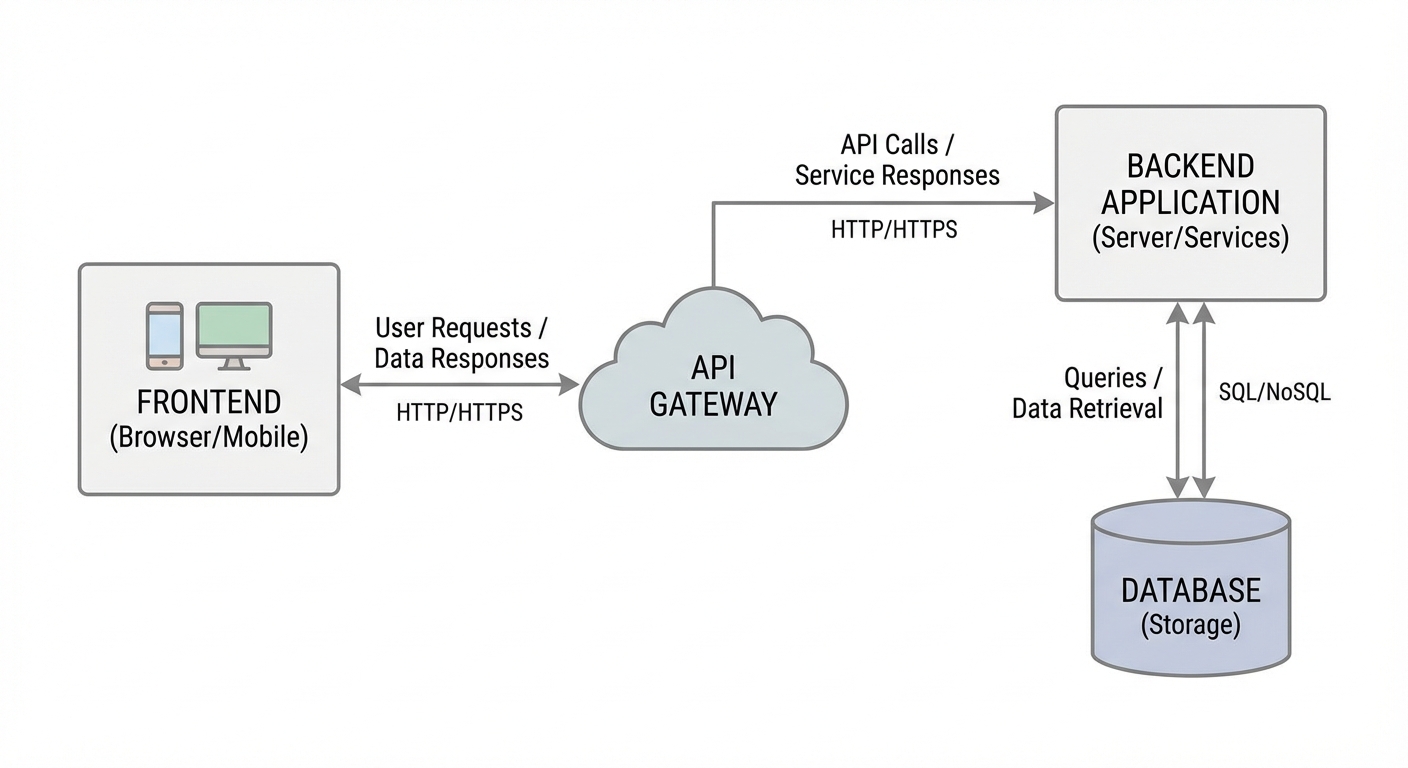
Good application architecture is essential to ensure that your app is easy to maintain, test, and scale. Common architectures include MVC (Model-View-Controller), MVVM (Model-View-ViewModel), and Clean Architecture.
2.4. Database and Data Storage
Databases are used to store and manage application data. Common types of databases include MySQL, PostgreSQL, MongoDB, and Firebase. The choice of database depends on the type of data stored and the application's needs.
2.5. Application Programming Interface (API)
APIs allow your app to interact with external services, such as social media, payment gateways, and cloudservices. Proper API usage can enhance your app's functionality and speed up the development process.
3. Challenges in App Development
Beyond technical complexity, there are many other challenges to address in app development, such as project management, testing, security, and maintenance.
3.1. Project Management
Effective project management is essential to ensure that your app project is completed on time and within budget. This involves planning, scheduling, resource management, and effective communication among team members.
3.2. Testing and Quality Assurance (QA)
Thorough testing is crucial to ensure that your app functions correctly and is free of bugs. Testing should include unit testing, integration testing, system testing, and user acceptance testing (UAT).
3.3. Application Security
Application security is vital to protect user data from security threats, such as hacking, malware, and phishing. Security measures to consider include data encryption, strong authentication, and input validation.
3.4. Maintenance and Updates
After an app is launched, regular maintenance and updates are essential to ensure that your app continues to function well and remain relevant. This includes fixing bugs, adding new features, and improving app performance.
4. App Development Costs
The cost of building an app can vary greatly depending on project complexity, technologies used, and the location of the development team. Some factors influencing app development costs include:
- Features: The more features required, the higher the development cost.
- Design: Complex UI/UX design will require higher costs.
- Platform: Developing an app for multiple platforms (iOS and Android) will be more expensive than for just one platform.
- Developer team location: Labor costs in developed countries are typically higher than in developing countries.
- Testing: Thorough testing will incur significant costs.
In our experience at OmindTech, we often find that initial cost expectations frequently underestimate the actual costs. It's important to create a realistic cost estimate and account for unexpected expenses.
5. Why Choose Custom Software?
While there are many platforms and tools to quickly create apps, custom software is often a better choice if you need greater flexibility and control over your app's features and functionality. Custom software allows you to create an app that perfectly suits your business needs and provides a unique user experience.
5.1. Advantages of Custom Software
- Flexibility: You have full control over the app's features and functionality.
- Scalability: The app can be scaled to meet evolving business needs.
- Security: You can implement security measures appropriate to your business needs.
- Integration: The app can be integrated with existing systems.
5.2. When to Choose Custom Software
- You have unique business needs that cannot be met by out-of-the-box.
- applications.
- You require integration with existing systems.
You need full control over data and application security.
Conclusion Building an app
Join the conversation.
Read reader responses, ask a question, or share your experience.
Keep exploring.
All articles
Technology
Integrated Financial Apps: The Key to Business Scalability
Discover how integrated financial applications and custom accounting software can slash reconciliation times by 80% and drive limitless business growth.

Technology
Beyond Hype: 3 Tech Trends 2026 Reshaping Indonesian Business
2026 marks the shift from AI experimentation to real-world deployment. From Agentic AI to PDP-compliant data sovereignty, discover how business infrastructure in Indonesia is evolving from passive to autonomous.

Technology
Beyond New Computers: Digitalizing Schools for Indonesia 2045
Why is a stack of computers in a school lab never enough? We dissect the harsh reality of digital transformation in Indonesian education and how ecosystem-driven digitalization can foster world-class talents for Golden Indonesia 2045.
LET’S WORK TOGETHER
Start with your story.
One conversation can open up a new perspective. Tell us about your challenge.