
Technology / OmindTech Journal
Mystery Unveiled: How Are Operating Systems Built From Scratch?
Have you ever wondered how operating systems, the heart of your computer, are created? This article will thoroughly explore the OS development process, from the first line of code to the interface you use daily.

Unveiling the Operating System Creation Process: From Code to Interface
An operating system (OS) is the most fundamental software on a computer. Without an OS, computer hardware is merely a collection of useless electronic components. The OS acts as a bridge between hardware and the applications you use daily, managing resources, and providing essential services such as memory management, file systems, and user interfaces.
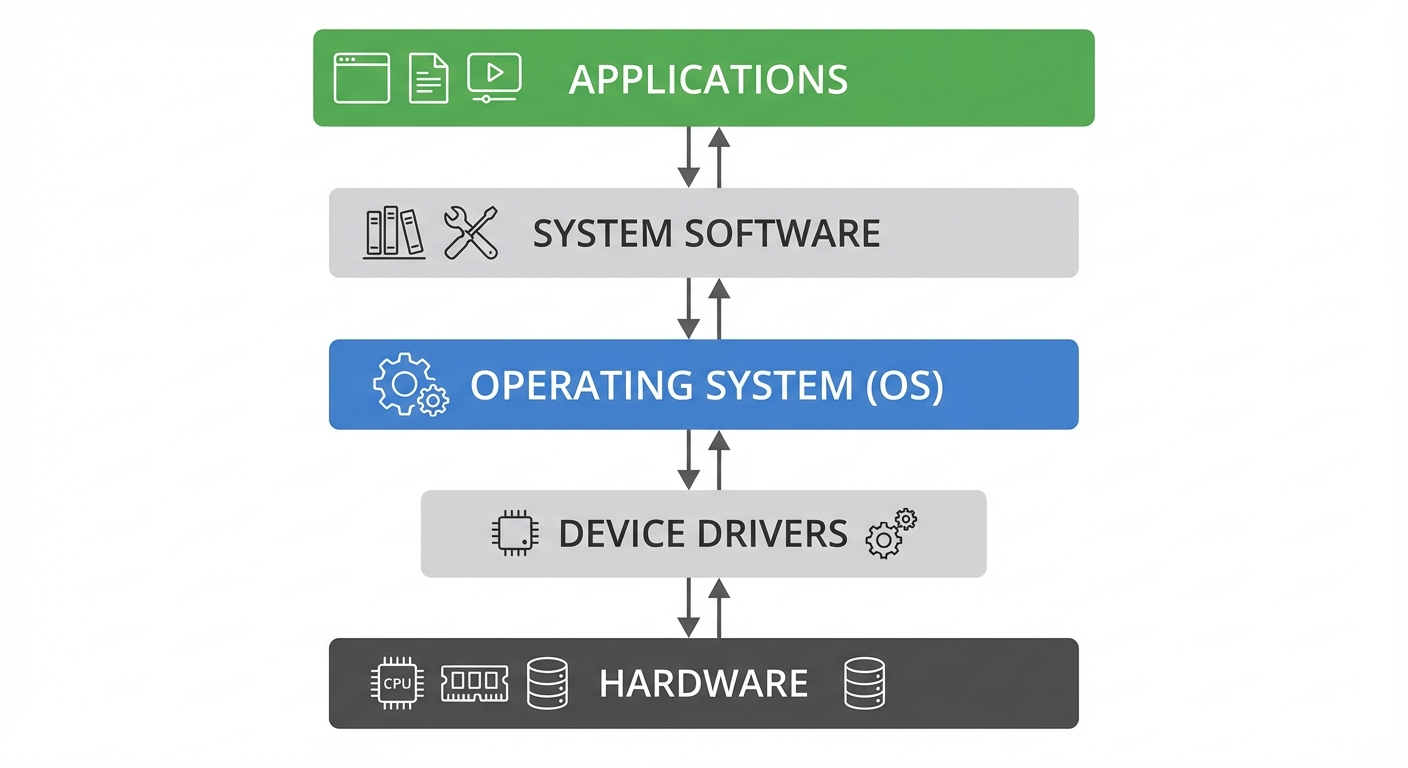
At OmindTech, we frequently encounter the need to understand and optimize operating system performance, especially when developing complex software solutions. This experience has taught us that a deep understanding of how an OS works is key to creating efficient and reliable applications.
Foundations: Programming Languages and Architecture
The OS creation process begins with the choice of programming language. Most modern OS, including Linux, Windows, and macOS, are written in C and C++. These languages provide low-level control over hardware and allow developers to optimize performance. Assembler is also often used for critical parts of the OS that require maximum efficiency.
OS architecture is also an important consideration. There are two main architectures: monolithic kernel and microkernel.
Monolithic Kernel: All OS services, such as memory management, file systems, and device drivers, run within a single kernel address space. This offers good performance but is also more vulnerable to bugs because a single error can cause the entire system to crash. Linux is an example of an OS with a monolithic kernel architecture.
Microkernel: Only core OS services run within the kernel, while other services run in user space. This increases stability and security but can reduce performance due to slower communication between the kernel and user services. QNX is an example of an OS with a microkernel architecture.
Stages of Operating System Development
Here are the general stages in operating system development:
Planning and Design: This stage involves determining OS features, architecture, and interfaces. The development team will design OS modules and how they will interact with each other.
Kernel Development: The kernel is the core of the OS and is responsible for resource management. Kernel development involves writing code for memory management, process scheduling, and interrupt management.
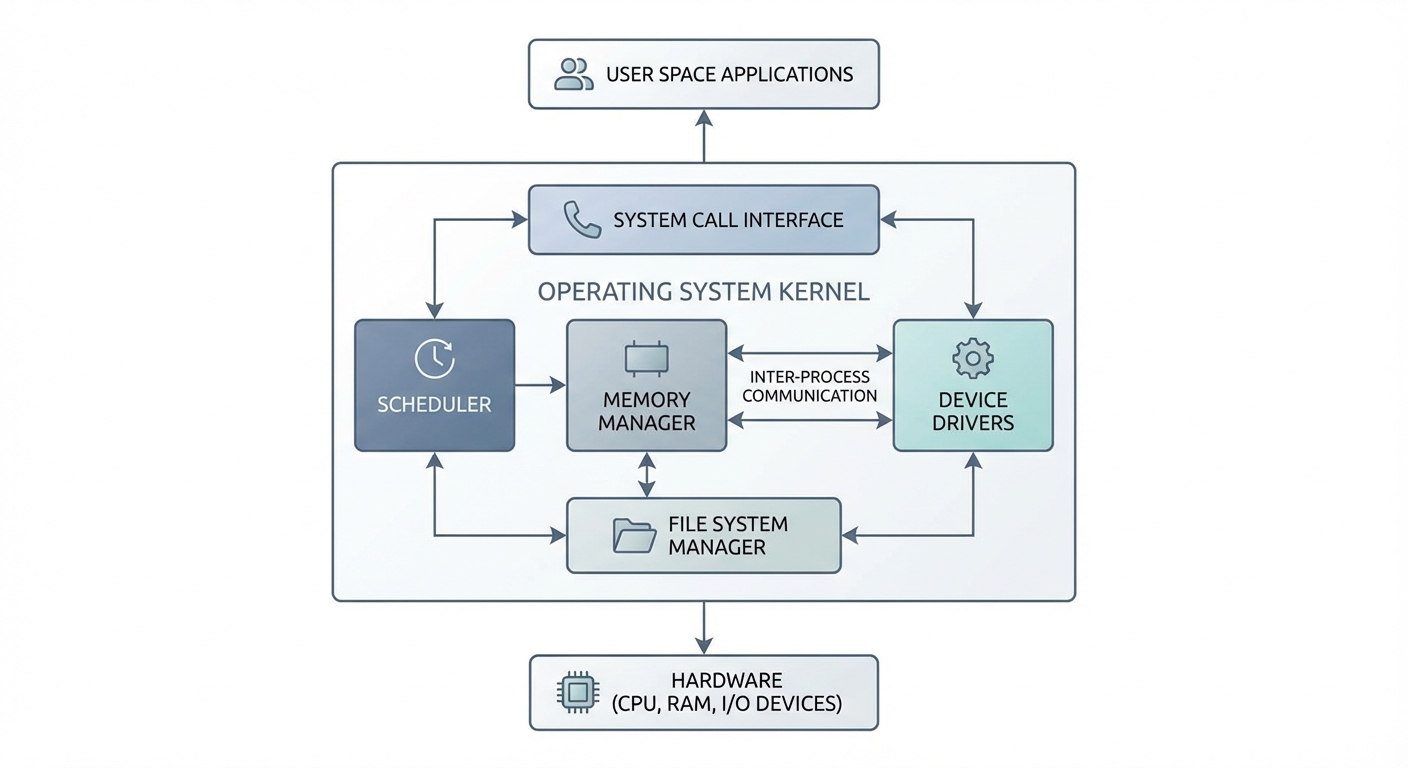
Device Driver Development: Device drivers enable the OS to communicate with hardware. Each piece of hardware requires a corresponding driver. Driver development can be challenging due to the wide variety of hardware.
File System Development: The file system organizes how data is stored and accessed on storage media. File system development involves implementing data structures and algorithms for storing and retrieving files.
User Interface Development: The user interface allows users to interact with the OS. This can be a command-line interface (CLI) or a graphical user interface (GUI).
Testing and Debugging: Once the code is written, the OS needs to be thoroughly tested to ensure stability and reliability. Testing involves running various applications and scenarios to find bugs and errors.
Optimization: After the OS functions correctly, the optimization stage aims to improve performance and efficiency. This involves performance analysis and code adjustments to minimize resource usage.
Key Components in an Operating System
Here are some key components in an operating system:
Kernel: As mentioned earlier, the kernel is the core of the OS and is responsible for resource management. It is the first part of the OS loaded into memory when the computer is turned on.
Process Manager: Manages processes running on the system. This includes the creation, scheduling, and termination of processes.
Memory Manager: Manages system memory, including memory allocation and deallocation for processes. It is also responsible for handling virtual memory.
File System: Organizes how data is stored and accessed on storage media. This includes directory and file organization, as well as access permissions.
Device Drivers: Enable the OS to communicate with hardware. Each piece of hardware requires a corresponding driver.
User Interface: Allows users to interact with the OS. This can be a CLI or a GUI.
Challenges in Operating System Development
Operating system development is a complex and challenging task. Some key challenges include:
Complexity: An OS is extremely complex software with millions of lines of code. Understanding and managing this complexity requires a skilled and experienced development team.
Stability and Reliability: An OS must be stable and reliable. Errors in the OS can cause the entire system to crash and lead to data loss. Rigorous testing is crucial to ensure stability and reliability.
Performance: An OS must be efficient and responsive. Users expect applications to run quickly and without lag. Performance optimization is key to providing a good user experience.
Security: An OS must be secure from malware attacks and other security threats. This requires the implementation of strong security mechanisms and continuous monitoring for vulnerabilities.
Compatibility: An OS must be compatible with various hardware and software. This requires extensive testing and support for a wide range of standards.
Key Takeaways
- An operating system is essential software that bridges hardware and applications.
- C and C++ are common programming languages used in OS development.
- The kernel is the core of the OS and is responsible for resource management.
- OS development is a complex and challenging process that requires a skilled development team.
- Stability, reliability, performance, security, and compatibility are important factors in OS development.
In our experience at OmindTech, understanding the intricacies of operating system development is crucial for building robust and efficient software solutions. By focusing on these key takeaways, developers can better navigate the complexities of system-level programming and contribute to the creation of reliable and performant operating systems.
We hope this article has provided a better understanding of how operating systems are created. If you are interested in learning more, many online resources and books are available. Happy learning!
Join the conversation.
Read reader responses, ask a question, or share your experience.
Keep exploring.
All articles
Technology
Integrated Financial Apps: The Key to Business Scalability
Discover how integrated financial applications and custom accounting software can slash reconciliation times by 80% and drive limitless business growth.

Technology
Beyond Hype: 3 Tech Trends 2026 Reshaping Indonesian Business
2026 marks the shift from AI experimentation to real-world deployment. From Agentic AI to PDP-compliant data sovereignty, discover how business infrastructure in Indonesia is evolving from passive to autonomous.

Technology
Beyond New Computers: Digitalizing Schools for Indonesia 2045
Why is a stack of computers in a school lab never enough? We dissect the harsh reality of digital transformation in Indonesian education and how ecosystem-driven digitalization can foster world-class talents for Golden Indonesia 2045.
LET’S WORK TOGETHER
Start with your story.
One conversation can open up a new perspective. Tell us about your challenge.