
Technology / OmindTech Journal
Uncovering Secrets: How Hackers Breach Security and How to Fight Back
Learn the tactics and techniques hackers use to breach security systems, along with effective prevention strategies to protect your data and digital assets.

Key Takeaways
- Understanding the *motives* and *methods* hackers use is the first step to protecting yourself.
- *Social Engineering* is often the easiest entry point for hackers.
- Layered security is crucial for preventing attacks.
- *Security awareness* for all users is the strongest line of defense.
- Regular system and software updates are a must.
At OmindTech.id, we often see businesses surprised when they fall victim to cyberattacks. They ask, 'How could this happen?' or 'We thought we were secure!' Unfortunately, thinking 'secure enough' is often not enough. The world of *cybersecurity* is an ever-evolving arena, and hackers are constantly seeking new ways to exploit weaknesses.
Let's dissect how hackers actually breach security. This article will reveal the tactics and techniques they use, as well as effective ways to protect yourself.
Motivations Behind Attacks: Why Do Hackers Do It?
Before we delve into techniques, it's important to understand *why* hackers do what they do. Their motivations vary, including:
- **Financial Gain:** This is the most common motivation. Hackers aim to steal money, credit card data, or other valuable information that can be sold.
- **Espionage:** Nations or corporations may hire hackers to steal trade secrets, intelligence information, or other sensitive data.
- **Activism:** *Hacktivists* attack organizations or individuals to express political or social opinions.
- **Damage:** Some hackers simply want to cause chaos and harm the reputation or infrastructure of a target.
- **Challenge:** For some hackers, breaching security systems is an intellectual challenge.
Common Techniques Used by Hackers: Dissecting Their Weapons
Now, let's look at some common techniques hackers use to breach security:
1. Social Engineering: Manipulating Human Minds
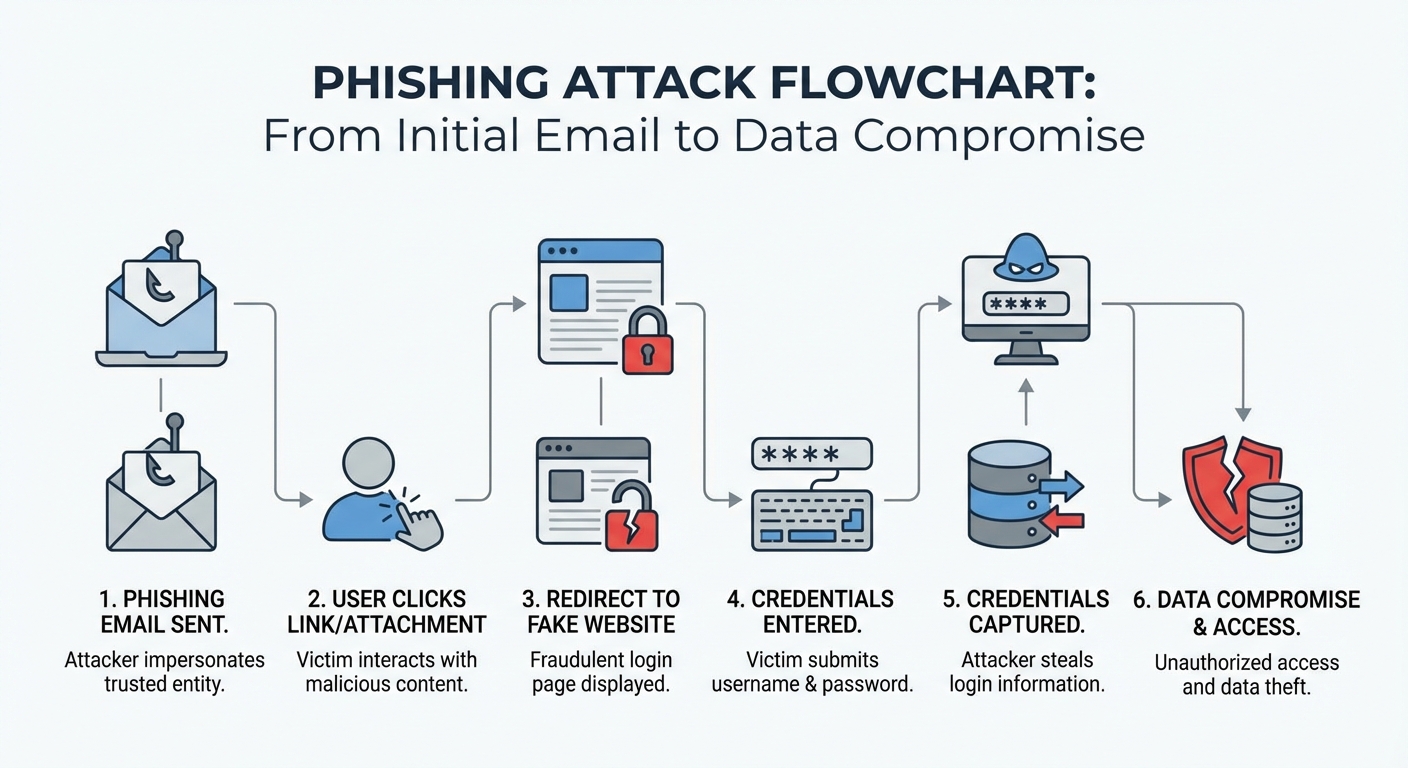
In our experience at OmindTech, *social engineering* often serves as the most effective entry point for hackers. This technique involves psychological manipulation to trick people into divulging sensitive information or performing harmful actions.
Common examples include:
- **Phishing:** Sending fraudulent emails that appear to originate from a trustworthy source (e.g., a bank or technology company) to request personal information.
- **Spear Phishing:** Phishing targeted at specific individuals or groups, using more specific personal information to increase credibility.
- **Pretexting:** Creating a false scenario to convince a victim to provide needed information.
- **Baiting:** Offering something enticing (e.g., free downloads or gifts) to lure victims into clicking malicious links or downloading malware.
- **Quid Pro Quo:** Offering help or services in exchange for requested information.
2. Malware: Malicious Software
Malware is a general term for malicious software designed to damage systems, steal data, or gain unauthorized access.
Common types of malware include:
- **Virus:** Software that attaches to other files and spreads when those files are executed.
- **Worm:** Software that can self-replicate and spread to other computers via a network without human intervention.
- **Trojan Horse:** Software that appears useful but actually contains malicious code.
- **Ransomware:** Software that encrypts a victim's data and demands a ransom to restore it.
- **Spyware:** Software that secretly collects information about user activity without their knowledge.
- **Keylogger:** Software that records all keystrokes typed by a user, including passwords and other sensitive information.
3. Exploits and Vulnerabilities: Leveraging System Weaknesses
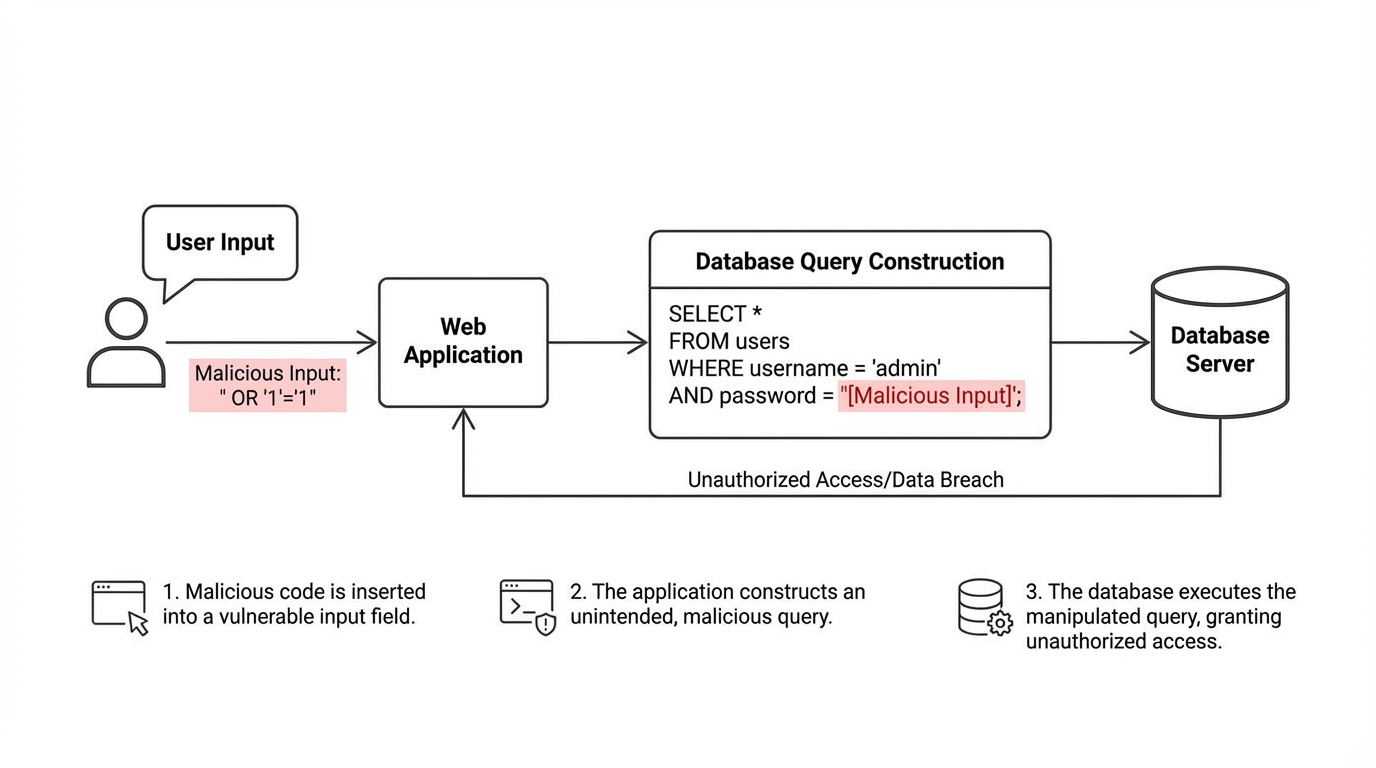
Every system or software has security flaws (*vulnerabilities*). Hackers search for these flaws and use *exploits* (code that leverages these flaws) to gain unauthorized access.
Examples include:
- **SQL Injection:** Injecting malicious SQL code into input forms to access or modify databases.
- **Cross-Site Scripting (XSS):** Injecting malicious JavaScript code into a website to steal cookies or redirect users to fake sites.
- **Buffer Overflow:** Sending more data to a buffer than it can hold, causing the system to crash or execute malicious code.
4. Brute Force: Trying All Password Combinations
*Brute force* attacks involve trying all possible password combinations until the correct one is found. This technique can be time-consuming but is effective if the victim's password is weak or easy to guess.
To prevent brute force attacks, use strong passwords (minimum 12 characters, a combination of uppercase and lowercase letters, numbers, and symbols) and enable two-factor authentication (2FA).
5. Distributed Denial-of-Service (DDoS): Crippling Services with Traffic Floods
DDoS attacks involve flooding a server or network with fake traffic, making it inaccessible to legitimate users. Hackers typically use networks of infected computers (*botnets*) to launch DDoS attacks.
How to Protect Yourself: A Fortification Against Cyberattacks
Having understood how hackers operate, let's discuss how to protect yourself:
1. Layered Security
Do not rely on just one layer of security. Use a layered approach, where each layer provides additional protection if another layer is breached.
Examples include:
- Firewall
- Antivirus
- Intrusion Detection System (IDS)
- Intrusion Prevention System (IPS)
- Two-Factor Authentication (2FA)
- Data Encryption
2. Security Awareness
Educate all users about cyber threats and how to avoid them. Train them to recognize phishing emails, strong passwords, and other good security practices.
At OmindTech, we often emphasize the importance of *security awareness* as the strongest line of defense. Even the most advanced security systems can be breached if users are not vigilant.
3. Regularly Update Systems and Software
Regularly update operating systems, applications, and software. Updates often contain security fixes that patch vulnerabilities that can be exploited by hackers.
4. Routinely Back Up Data
Back up your data routinely and store it in a secure location. In the event of a ransomware attack or other disaster, you can restore your data without having to pay a ransom or lose important information.
5. Monitor Logs and Network Activity
Regularly monitor logs and network activity to detect suspicious activity. If you notice anything unusual, investigate immediately.
FAQ: Common Questions About Cybersecurity
1. Is antivirus software enough to protect me from hacker attacks?
No. Antivirus is an important layer, but it's not enough. You need to implement a layered security approach and educate users about security awareness.
2. What should I do if I suspect I've been a victim of phishing?
Immediately change your password, check your bank and credit card accounts for suspicious activity, and report the incident to the relevant service providers (e.g., banks or technology companies).
3. How do I create a strong password?
Use a password that is at least 12 characters long, a combination of uppercase and lowercase letters, numbers, and symbols. Do not use easily guessable passwords, such as birth dates or pet names. Use a password manager to help you create and store strong passwords.
4. What is two-factor authentication (2FA) and why should I use it?
Two-factor authentication (2FA) adds an extra layer of security by requiring you to enter a verification code from another device (e.g., your phone) in addition to your password. This makes it harder for hackers to access your account, even if they manage to steal your password.
Join the conversation.
Read reader responses, ask a question, or share your experience.
Keep exploring.
All articles
Technology
Integrated Financial Apps: The Key to Business Scalability
Discover how integrated financial applications and custom accounting software can slash reconciliation times by 80% and drive limitless business growth.

Technology
Beyond Hype: 3 Tech Trends 2026 Reshaping Indonesian Business
2026 marks the shift from AI experimentation to real-world deployment. From Agentic AI to PDP-compliant data sovereignty, discover how business infrastructure in Indonesia is evolving from passive to autonomous.

Technology
Beyond New Computers: Digitalizing Schools for Indonesia 2045
Why is a stack of computers in a school lab never enough? We dissect the harsh reality of digital transformation in Indonesian education and how ecosystem-driven digitalization can foster world-class talents for Golden Indonesia 2045.
LET’S WORK TOGETHER
Start with your story.
One conversation can open up a new perspective. Tell us about your challenge.