
Technology / OmindTech Journal
Revealed: The Secrets Behind the Scenes - How Computers Work In-Depth
A complete and in-depth guide to how computers work, from basic components to processors and memory. Learn the steps with easy-to-understand explanations.

Key Takeaways:
- Computers operate through a series of instructions called programs, processed by the CPU.
- Memory (RAM) serves as temporary storage for data currently being processed by the CPU.
- The interaction between hardware and software is crucial for a computer's functionality.
Have you ever wondered how the magical devices we use every day truly work? From sending emails to playing demanding games, computers do everything with incredible precision. At OmindTech.id, we often encounter similar questions, and in this guide, we will unveil the mystery behind the scenes and explain how computers work in-depth and in an easy-to-understand manner.
Basic Computer Components
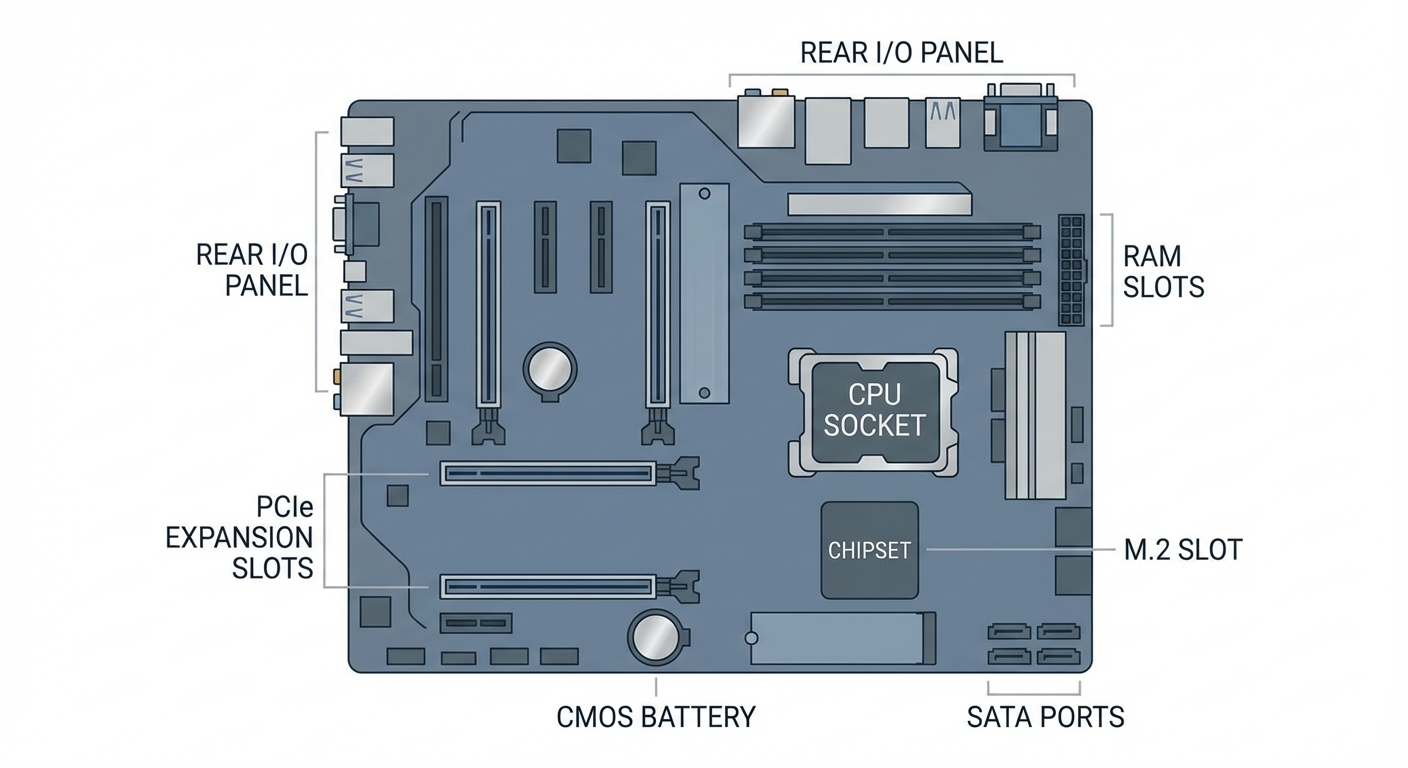
A computer is not a single mysterious entity, but rather a combination of various components working together. Let's discuss some of the most important:
- CPU (Central Processing Unit): The brain of the computer. The CPU executes instructions provided by software. The faster the CPU, the faster the computer can process data.
- RAM (Random Access Memory): The computer's short-term memory. RAM stores data and instructions currently in use by the CPU. If RAM is full, the computer will become slow.
- Storage (Hard Drive/SSD): The computer's long-term storage. This is where your operating system, applications, and files are stored. An SSD (Solid State Drive) is significantly faster than a traditional Hard Drive.
- Motherboard: The main circuit board that connects all computer components.
- GPU (Graphics Processing Unit): Responsible for processing graphics. Important for gaming and graphic design applications.
- Power Supply: Provides electrical power to all computer components.
Instruction Process: How the CPU Works
The CPU is the center of all activity in a computer. It receives instructions from RAM, processes them, and sends the results back to RAM or storage. This process occurs in a repeating cycle, known as the fetch-decode-execute cycle.
- Fetch: The CPU retrieves instructions from RAM.
- Decode: The CPU translates the instructions into a language understood by the arithmetic logic unit (ALU).
- Execute: The ALU performs the operations commanded by the instructions.
- Store: The results of the operations are stored back in RAM.
This cycle occurs billions of times per second, thanks to the CPU's clock speed, measured in GHz (Gigahertz). The higher the GHz, the faster the CPU can process instructions.
Pro Tip: When buying a new computer, pay attention to the CPU specifications. The number of cores and threads is also important, as it determines how well the CPU can handle multitasking.
The Role of Memory (RAM)
RAM acts as a scratchpad for the CPU. When you open an application or file, that data is loaded into RAM. This allows the CPU to access data quickly without having to read from storage (which is much slower).
The more RAM you have, the more applications you can open simultaneously without slowing down your computer. Insufficient RAM is often a primary cause of a slow-feeling computer.
At OmindTech.id, we often recommend having at least 8GB of RAM for everyday use, and 16GB or more for gaming or creative work.
Operating System: The Bridge Between Hardware and Software
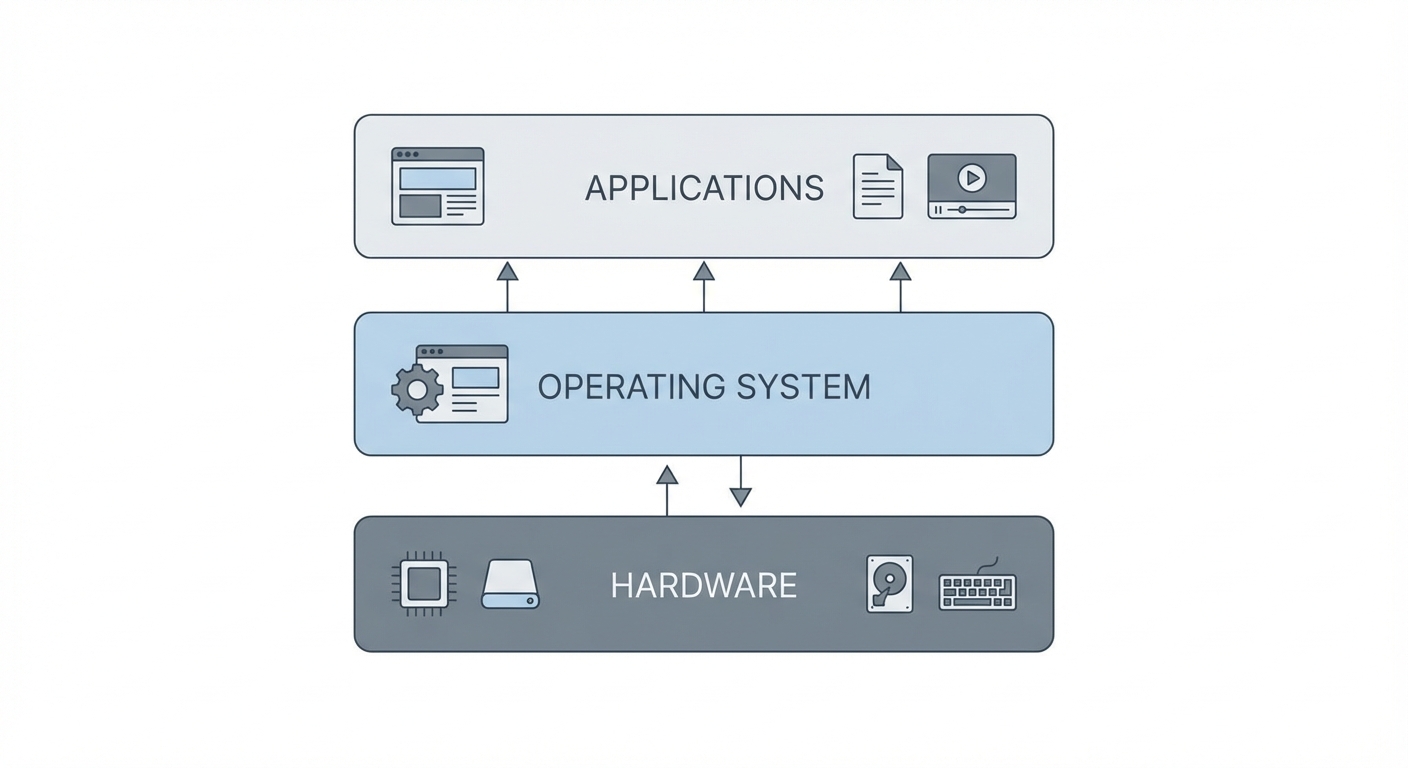
An operating system (OS) is software that manages all the hardware and software on a computer. Popular examples of operating systems include Windows, macOS, and Linux.
The OS performs various important tasks, including:
- Managing memory and CPU resources.
- Providing a user interface (UI) so you can interact with the computer.
- Managing files and folders.
- Managing networks and internet connections.
Without an operating system, a computer cannot function. The OS acts as a bridge between hardware and software, allowing them to communicate and work together.
Input and Output
Computers interact with the outside world through input and output. Input is data entering the computer, such as typing from a keyboard or clicking a mouse. Output is data leaving the computer, such as display on a monitor or sound from speakers.
Input and output devices communicate with the computer via drivers. A driver is a small piece of software that allows the OS to recognize and use specific hardware.
Programming Languages and Software
All the software you use, from web browsers to games, is written in programming languages. A programming language is a formal language used to give instructions to a computer.
Popular examples of programming languages include Python, Java, C++, and JavaScript. Each programming language has its own syntax and rules.
Software is developed by programmers using programming languages. The software is then compiled or interpreted into machine code that can be executed by the CPU.
A common mistake I see is people think faster CPU means better performance all the time. It is often that the software is simply not optimized. Good software optimization can improve performance even on lower-end hardware.
Conclusion
How a computer works involves a complex interaction between hardware and software. Understanding basic components, instruction processing, the role of memory, and the functions of the operating system is key to comprehending how a computer operates. We hope this guide is useful and provides you with new insights.
FAQ (Frequently Asked Questions)
1. What is the difference between RAM and a Hard Drive?
RAM is short-term memory used to store data currently being processed by the CPU. A Hard Drive is long-term storage used to store data permanently.
2. Do I need to clean my computer's RAM?
Modern operating systems automatically manage RAM. You do not need to clean RAM manually, unless you are experiencing specific issues.
3. What is CPU overclocking?
Overclocking is the process of increasing the CPU's clock speed above factory specifications. This can boost performance, but it can also cause overheating and instability.
4. How do I find my computer's specifications?
On Windows, you can view your computer's specifications by opening System Information (search in the Start Menu). On macOS, you can view your computer's specifications by opening About This Mac (in the Apple menu).
Join the conversation.
Read reader responses, ask a question, or share your experience.
Keep exploring.
All articles
Technology
Integrated Financial Apps: The Key to Business Scalability
Discover how integrated financial applications and custom accounting software can slash reconciliation times by 80% and drive limitless business growth.

Technology
Beyond Hype: 3 Tech Trends 2026 Reshaping Indonesian Business
2026 marks the shift from AI experimentation to real-world deployment. From Agentic AI to PDP-compliant data sovereignty, discover how business infrastructure in Indonesia is evolving from passive to autonomous.

Technology
Beyond New Computers: Digitalizing Schools for Indonesia 2045
Why is a stack of computers in a school lab never enough? We dissect the harsh reality of digital transformation in Indonesian education and how ecosystem-driven digitalization can foster world-class talents for Golden Indonesia 2045.
LET’S WORK TOGETHER
Start with your story.
One conversation can open up a new perspective. Tell us about your challenge.