
Technology / OmindTech Journal
Phishing: Understanding the Threat and How to Protect Yourself (A Complete Guide)
Phishing is an online fraud attempt aimed at stealing your personal information. Learn how to recognize and prevent phishing attacks with this comprehensive guide.

Phishing: Understanding the Threat and How to Protect Yourself (A Complete Guide)
Phishing is one of the most common and dangerous cybersecurity threats. You may often hear this term, but do you truly understand what phishing is and how it works? This article will provide a complete guide to phishing, including various types of attacks, how to recognize their signs, and steps you can take to protect yourself.
What Is Phishing?
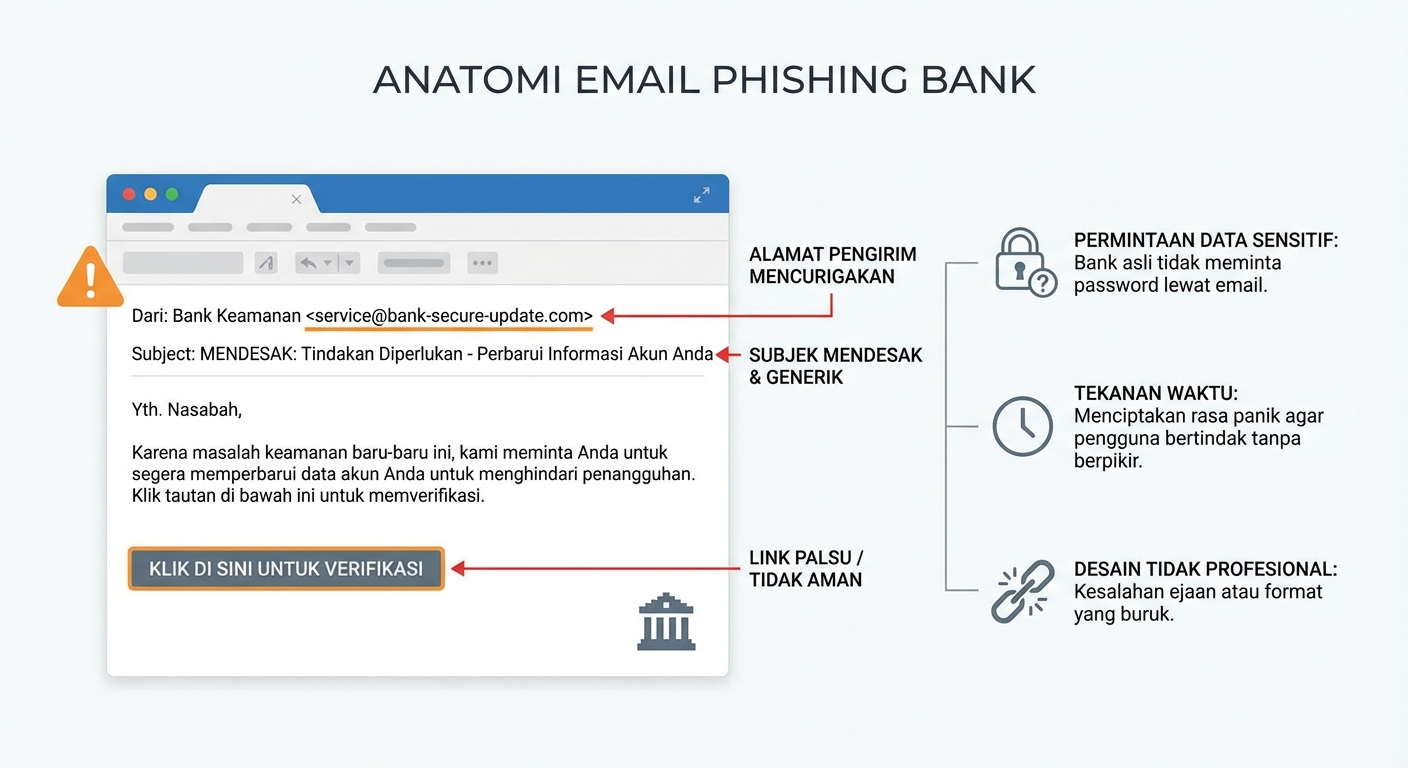
Phishing is a fraudulent act carried out by malicious parties (phishers) to obtain sensitive information, such as usernames, passwords, credit card information, and other personal data. Phishers typically impersonate trusted entities, such as banks, technology companies, or government agencies, to trick victims into providing their information.
How Does Phishing Work?
Phishing attacks typically begin with a convincing email, text message, or phone call that appears to come from a legitimate source. These messages often contain links to fake websites that look like the genuine website of the impersonated entity. When victims enter their personal information into these fake websites, the information is stolen by the phisher.
In our experience at OmindTech, we've seen a significant increase in sophisticated phishing attacks that are increasingly difficult to detect. These attacks often leverage social engineering techniques to exploit human psychology and trick individuals into divulging sensitive information.
Common Steps in a Phishing Attack:
- Phisher sends a message: This message can be an email, a text message (SMS), or even a phone call.
- Message contains a link or request: The message usually contains a link to a fake website or a request to provide personal information.
- Victim clicks the link or provides information: If the victim clicks the link, they will be directed to a fake website designed to steal their information. If the victim provides the requested information, it will fall into the hands of the phisher.
- Phisher uses the stolen information: Stolen information can be used for various malicious purposes, such as identity theft, financial fraud, or accessing the victim's online accounts.
Types of Phishing Attacks
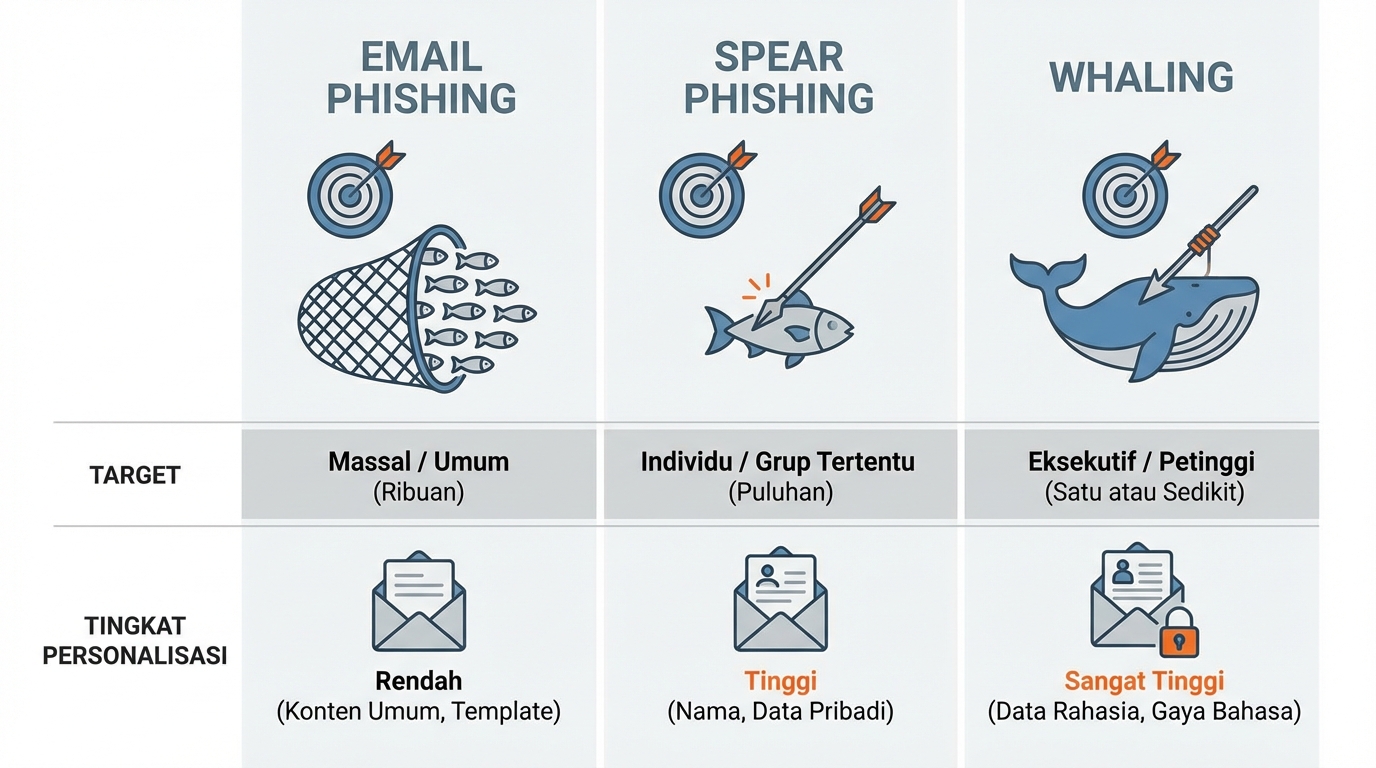
There are various types of phishing attacks, each with different characteristics and tactics. Here are some of the most common types of phishing attacks:
- Email Phishing: This is the most common type of phishing, where phishers send fake emails impersonating a legitimate entity.
- Spear Phishing: This attack targets specific individuals or groups with highly personalized messages.
- Whaling: This attack targets high-level executives or wealthy individuals in hopes of gaining access to confidential information or financial assets.
- Smishing (SMS Phishing): This attack uses text messages (SMS) to trick victims into providing their personal information.
- Vishing (Voice Phishing): This attack uses phone calls to trick victims into providing their personal information.
- Pharming: Redirects victims to fake websites without their knowledge, often through DNS manipulation.
Signs of a Phishing Attack
Recognizing the signs of a phishing attack is key to protecting yourself. Here are some things to look out for:
- Suspicious sender email address: Carefully check the sender's email address. Does it look strange or unprofessional?
- Grammar and spelling errors: Phishing messages often contain grammar and spelling errors.
- Suspicious links: Hover your mouse cursor over a link before clicking it to see its original URL. Does it seem irrelevant or suspicious?
- Requests for personal information: Be wary of messages asking for personal information, such as passwords or credit card numbers.
- Sense of urgency: Phishing messages often create a sense of urgency to pressure victims into acting quickly.
- Not personalized: Mass phishing emails are often generic and do not include your name.
How to Protect Yourself from Phishing Attacks
Here are some steps you can take to protect yourself from phishing attacks:
- Be wary of suspicious emails and messages: Always check the sender's email address, grammar, and links before clicking anything.
- Never provide personal information via email or phone: Legitimate entities will never ask you to provide your personal information via email or phone.
- Use strong and unique passwords for all your online accounts: Avoid using the same password for multiple accounts.
- Enable two-factor authentication (2FA) if available: 2FA adds an extra layer of security to your accounts.
- Regularly update your security software: Ensure your antivirus and anti-malware software is always up to date.
- Be aware of social engineering techniques: Phishers often use social engineering techniques to trick people into giving up their personal information.
- Report phishing attempts: If you receive an email or message that you suspect is phishing, report it to the impersonated entity and the relevant authorities.
Conclusion
Phishing is a serious threat that can have detrimental consequences. By understanding how phishing works, recognizing its signs, and taking appropriate preventive measures, you can protect yourself from becoming a victim of this online fraud. In our experience at OmindTech, consistent vigilance and a healthy dose of skepticism are the best defenses against phishing attacks. Always be cautious and never hesitate to verify the authenticity of a message or request before providing any information.
Disclaimer:
This article is for general informational purposes only about phishing and should not be considered legal or financial advice. If you have specific questions or concerns about phishing, it is best to consult with a qualified professional.
Join the conversation.
Read reader responses, ask a question, or share your experience.
Keep exploring.
All articles
Technology
Integrated Financial Apps: The Key to Business Scalability
Discover how integrated financial applications and custom accounting software can slash reconciliation times by 80% and drive limitless business growth.

Technology
Beyond Hype: 3 Tech Trends 2026 Reshaping Indonesian Business
2026 marks the shift from AI experimentation to real-world deployment. From Agentic AI to PDP-compliant data sovereignty, discover how business infrastructure in Indonesia is evolving from passive to autonomous.

Technology
Beyond New Computers: Digitalizing Schools for Indonesia 2045
Why is a stack of computers in a school lab never enough? We dissect the harsh reality of digital transformation in Indonesian education and how ecosystem-driven digitalization can foster world-class talents for Golden Indonesia 2045.
LET’S WORK TOGETHER
Start with your story.
One conversation can open up a new perspective. Tell us about your challenge.